

The AI assistant inside the dashboards you already use.
Query visible data in Power BI, Qlik Sense and Superset while keeping filters and selections. Get answers, KPIs and charts without leaving your BI environment.
From your current view to a better-informed decision.
Understand performance across regions, customers and products. Analyse variances between Actual, Budget and Forecast, prepare management summaries in your chosen language and explore further with follow-up questions in the same context.
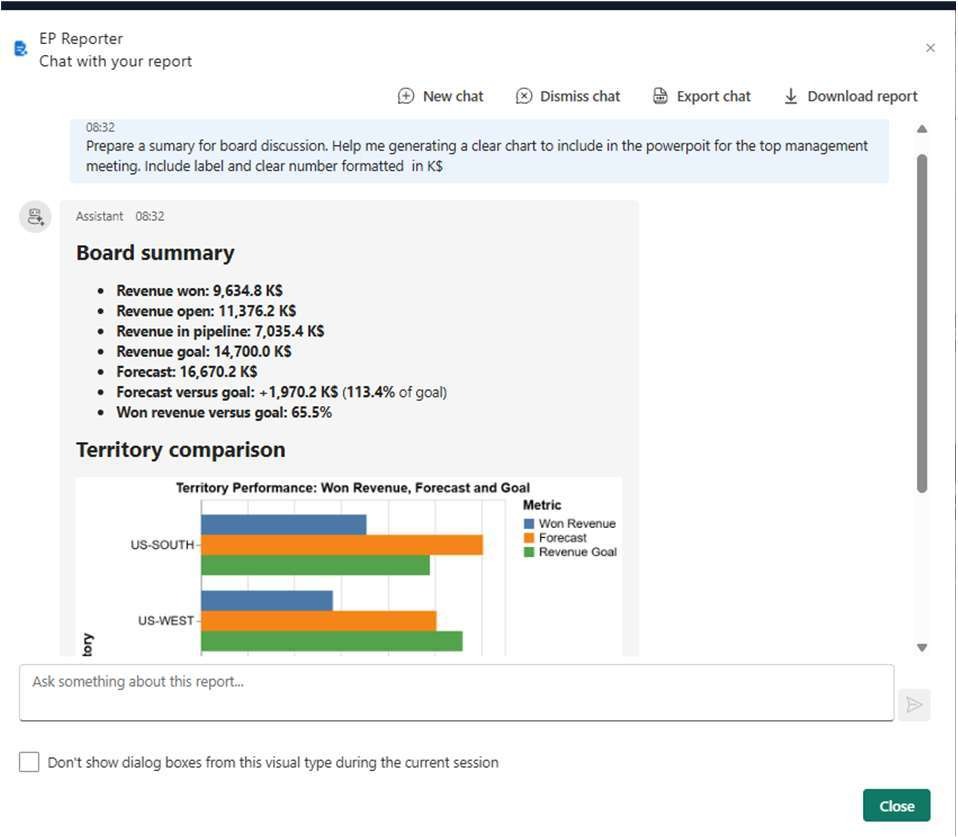
An answer combining text, KPIs and charts.
The assistant brings together narrative summaries, indicators, percentages and comparisons. Vega-Lite charts can show rankings, trends, distributions, relationships, matrices and geographical data, with multiple or layered views depending on the question and results.
Generate. Copy. Reuse.
Copy the text or chart image and use the analysis in presentations, documents, emails or messages. Review results before sharing them.
How it works: from context to answer
BI context
The assistant collects tables, filters, selections and metadata from the selected visualisations, within the authorised scope.
Session database
When the chat starts, extracted data is normalised into a SQLite database. The model receives descriptions of the schema and tools; the database is not sent as an attachment.
Question and queries
The model interprets the question and requests the queries it needs through tools. EP AI Analyst runs the queries and returns the results to the model.
Answer and follow-up
The cycle can repeat to build an answer with text, KPIs and charts. Users can continue the conversation within the same analytical context.
Control your data and choose your model.
Configure assistants, providers, models, system prompts and permitted fields. LLM credentials remain in the backend; the client key identifies the integration. The console monitors requests, tokens and costs according to the customer’s configuration.
Managed AI or BYO AI
Choose model access managed by E-project or connect your company’s AI provider, such as Azure OpenAI or Gemini. Data scope, rules and limits are defined for the project.
From configuration to go-live
We define reports, users and priority questions. We connect the service, configure the model, prompts and data, then validate answer quality, charts, usage and controls before go-live. Monitoring supports expansion to new use cases.
Bring a real report. Let’s start with your questions.
Let’s assess your first EP AI Analyst assistant in your BI environment.