
Make time for analysis
Reduce repetitive exports, formatting and deliveries. Automate report preparation and spend more time interpreting results.

REPORTING AUTOMATION · CONTEXTUAL AI
EP Reporter + AI delivers the right information to the right person: it automates reports, personalises distribution and lets users query data within their own information scope.
FROM BI TO INFORMATION DELIVERY
Extracting, filtering, preparing PDF or Excel files, distributing and commenting: when the report repeats, the work often repeats too. EP Reporter + AI brings these tasks into an automated, personalised and governed process.
Reduce repetitive exports, formatting and deliveries. Automate report preparation and spend more time interpreting results.
Distribute personalised content even to people who do not use BI every day, in the intended format and information scope.
Explore KPIs, trends and variances with AI, starting from the report and the context configured for the user.
END-TO-END PROCESS
A configured workflow to collect data, generate personalised reports, distribute them and explore them with AI.
Integrate Qlik Sense, Power BI, Apache Superset, databases and business sources such as ERP and CRM, according to the integrations defined for the project.
Produce recurring reports according to defined rules: KPIs, Budget vs Actual, sales, production, projects and performance.
Adapt data and content to roles, areas, customers, projects and organisational responsibilities.
Deliver the report automatically, without requiring recipients to search the BI platform for information every time.
The user asks a question and AI starts from the report and the configured information scope.
VALUE FOR YOUR BUSINESS
Reduce manual preparation, exports and delivery. Centralise rules and distribution.
Reach people who do not use BI every day with content relevant to their role.
Bring BI environments and business applications together in a single information flow.
Explore KPIs, anomalies, trends and variances without rebuilding the scope of each question.
Configure the information scope in line with responsibilities and permissions.
Use AI for summaries, tables, charts and further processing, according to the adopted configuration.
GOVERNED AI CONTEXT
“Which customers are underperforming?” may require different answers for a Sales Director, an Area Manager or a sales representative. EP Reporter + AI combines three dimensions to create an experience aligned with the user’s role.
Which data can the user see? Geographic area, Business Unit, customers, projects, cost centre, plant and function define the authorised scope.
How should data be interpreted? KPIs, metrics, dimensions and business rules give information its meaning.
What is the user analysing? Report, period, filters and selections make the question relevant to the current view.
FIVE AREAS, ONE MODEL
Explore use cases for your function: the report you receive, the AI context and the questions to start with.
Management does not need another 50 KPIs. It needs to understand which 3 need attention now.
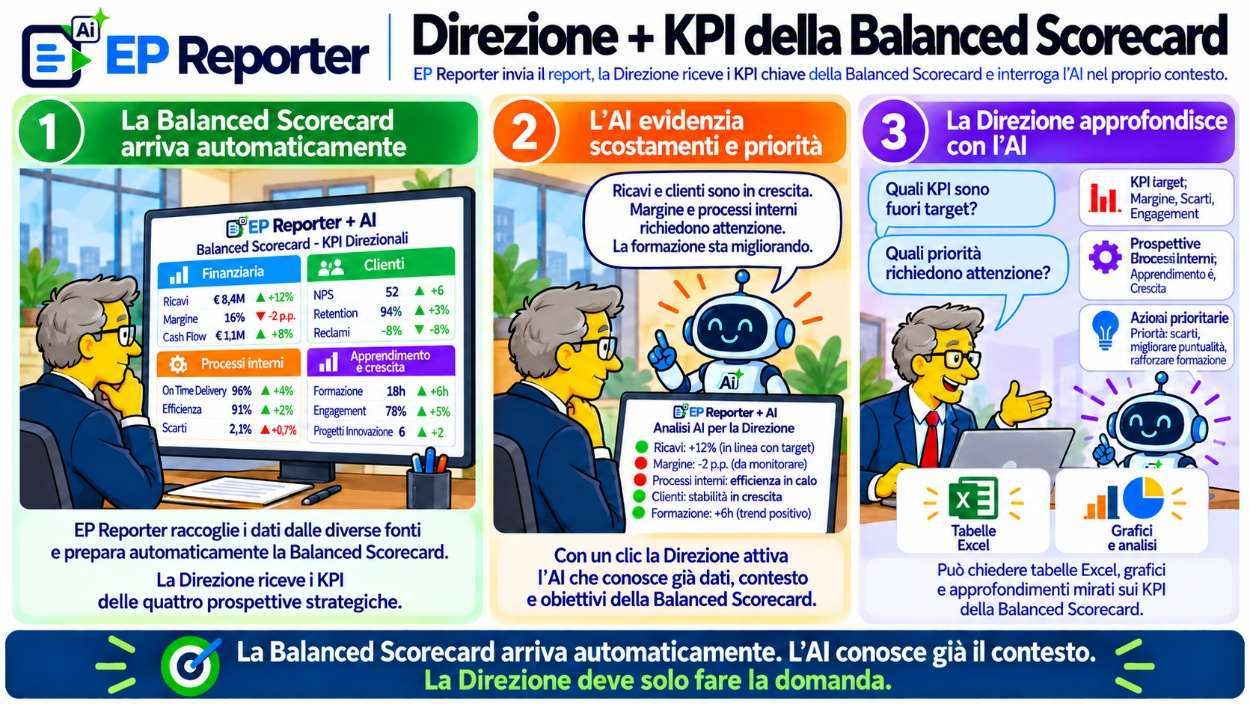
With EP Reporter + AI, the Balanced Scorecard can reach management automatically with KPIs across four perspectives:
Financial · Customers · Internal processes · Learning and growth
AI highlights the most relevant variances and lets you explore them immediately:
AI already knows the context. Management only needs to ask the question.
Being over budget is a fact. Understanding why is what enables decisions.
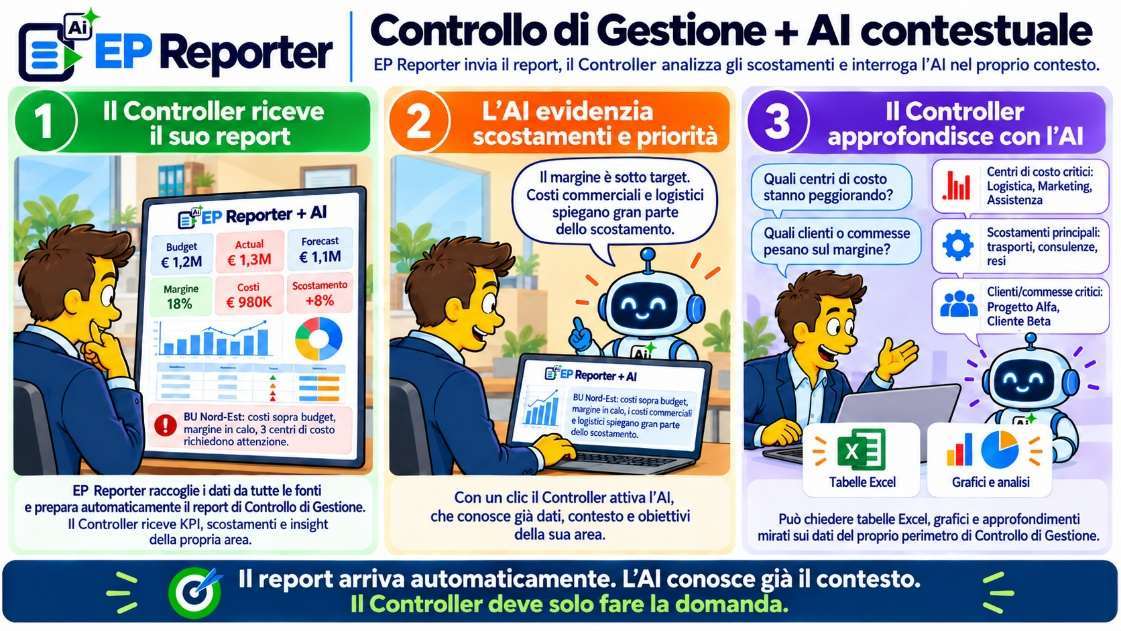
With EP Reporter + AI, the management controller automatically receives a report covering:
Budget vs Actual · Forecast · Margins · Costs · Variances
AI can immediately highlight critical areas and help explore:
AI already knows the context. The controller only needs to ask the question.
Knowing revenue is falling is a fact. Understanding which customers and products are causing the decline is what enables action.
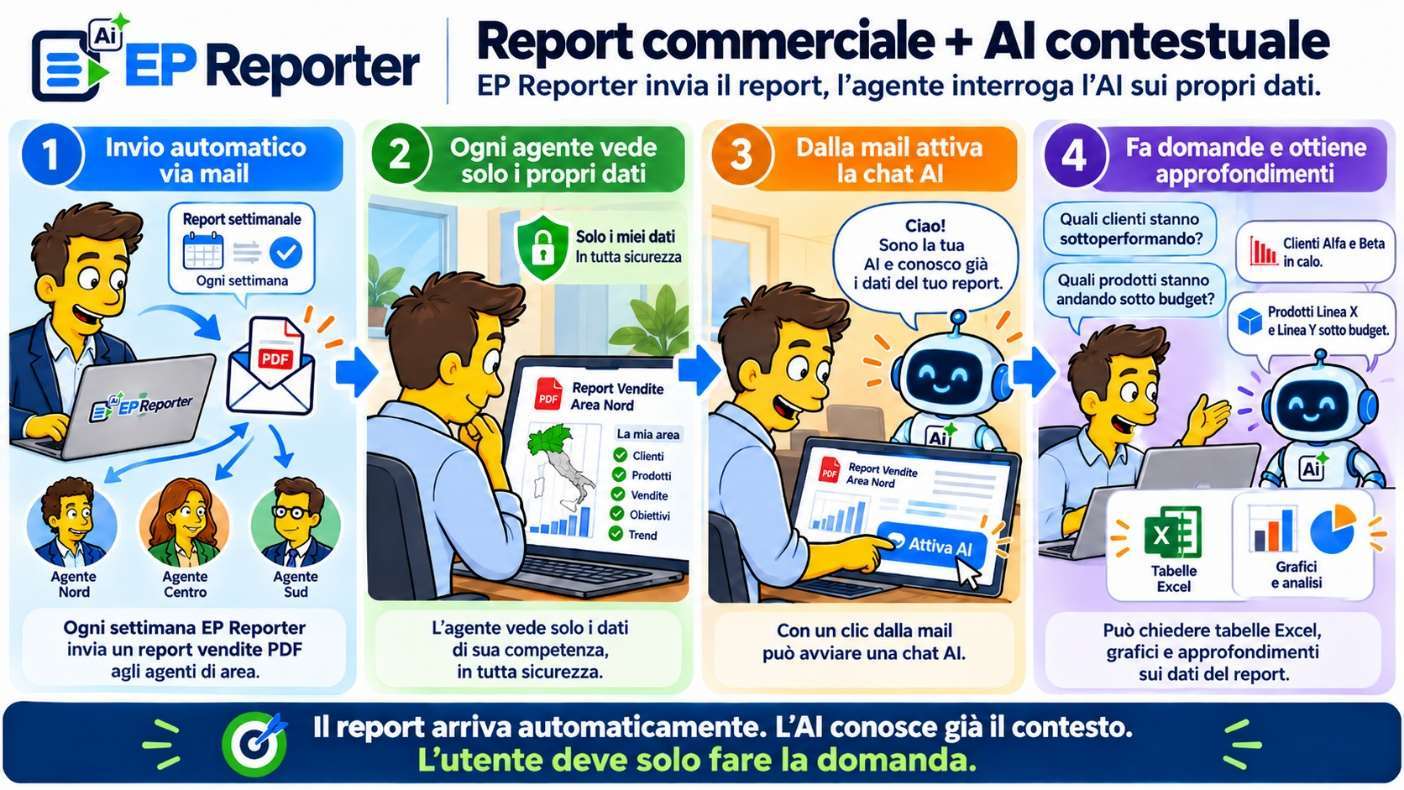
With EP Reporter + AI, each Area Manager or sales representative automatically receives a report covering:
Sales · Margins · Budget · Customers · Products within their remit
AI can immediately highlight the main issues and help explore:
AI already knows the salesperson’s scope. The user only needs to ask the question.
Knowing a line is producing less than expected is a fact. Understanding where inefficiencies, downtime and scrap arise is what enables action.
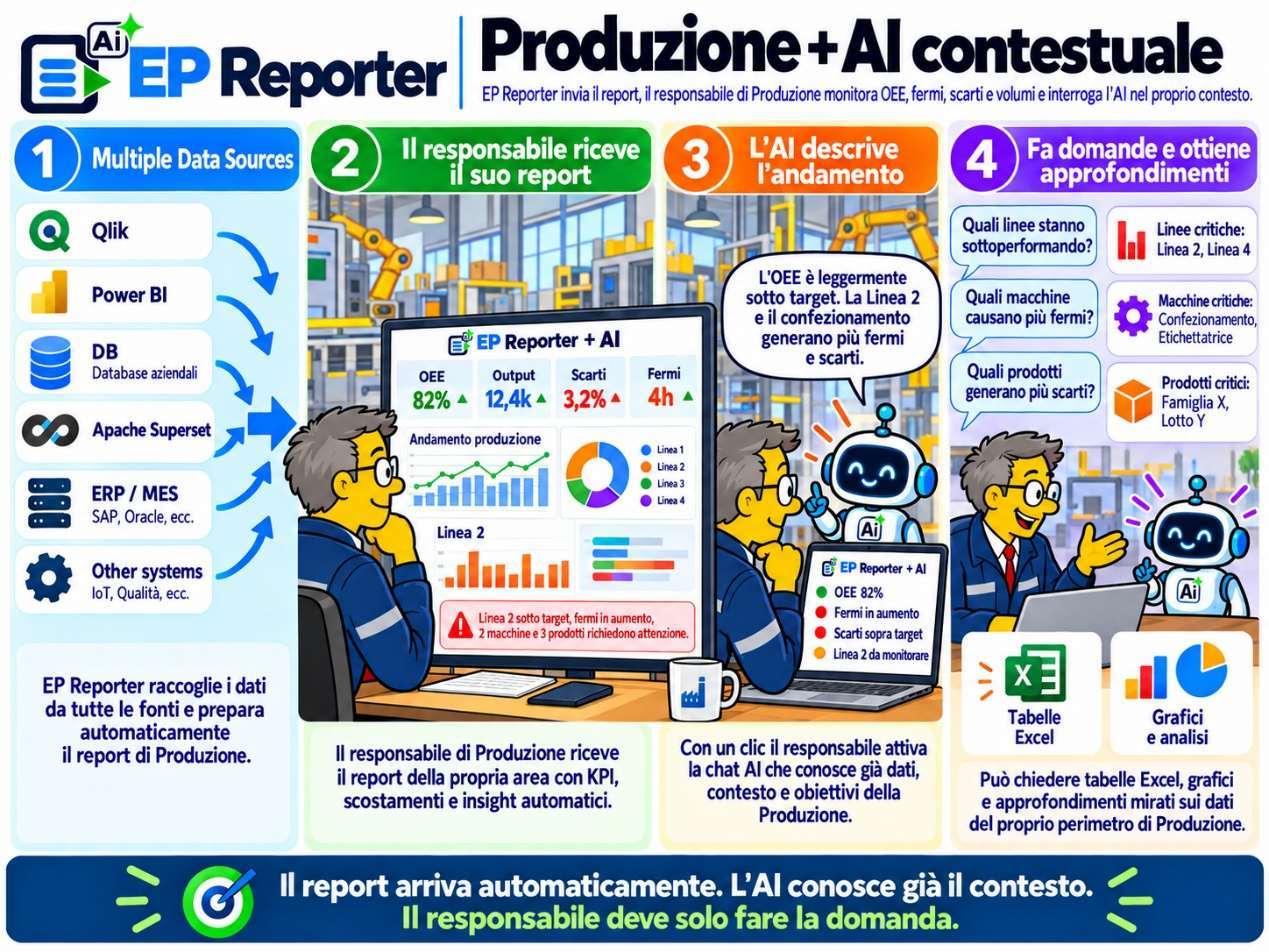
With EP Reporter + AI, the Production Manager automatically receives a report covering:
OEE · Productivity · Machine downtime · Scrap · Cycle times · Progress against plan
AI can immediately highlight the main issues and help explore:
AI already knows the production context. The manager only needs to ask the question.
Knowing a project is late is a fact. Understanding which initiatives are going off plan, where risks are concentrated and which dependencies need attention is what enables action.
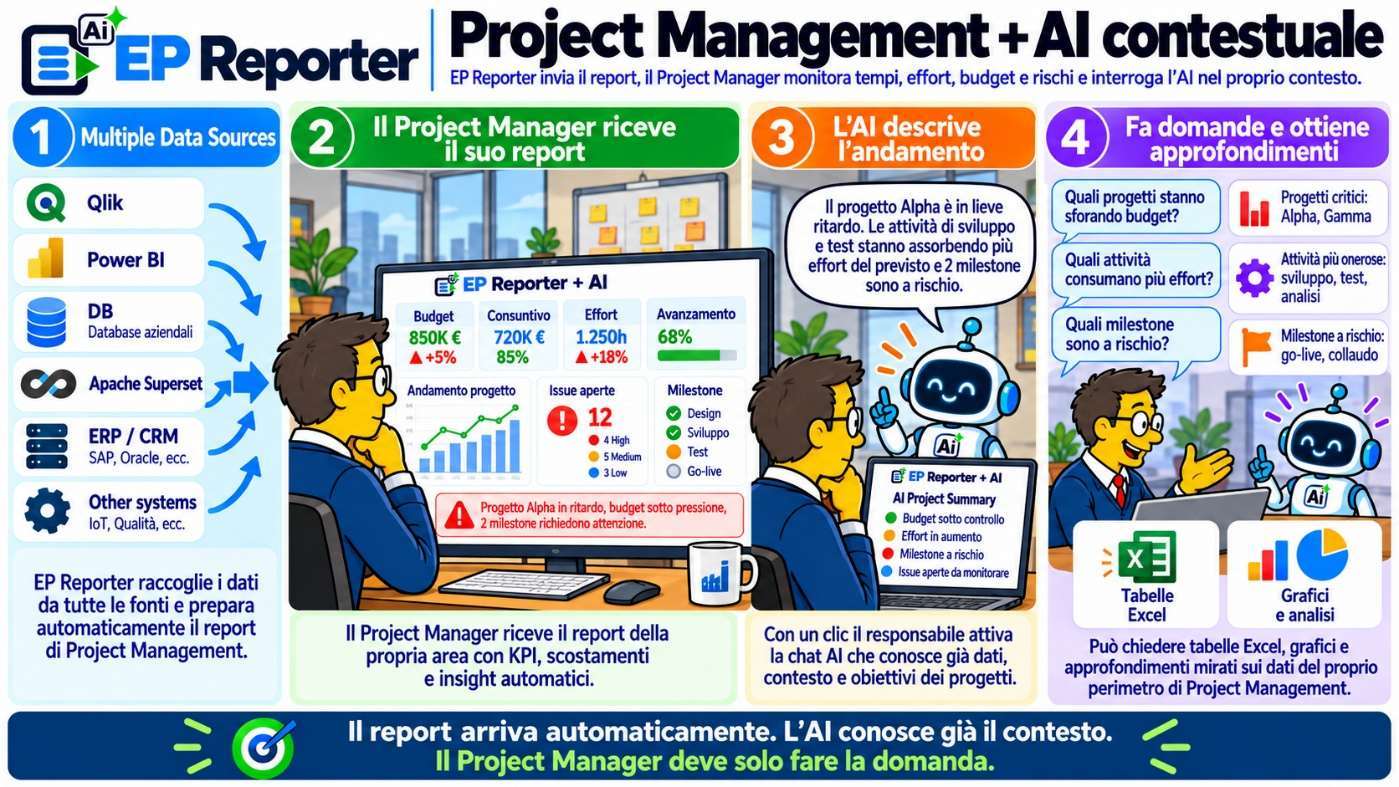
With EP Reporter + AI, the Project Manager automatically receives a consolidated view of:
Progress · Budget · Milestones · Risks · Effort · Issues
AI can immediately highlight anomalies and help explore:
AI already knows the project context. The Project Manager only needs to ask the question.
FITS YOUR ENVIRONMENT
Qlik Sense, Power BI, Apache Superset and other platforms continue to provide analysis and visualisation. EP Reporter + AI adds automation, personalisation, distribution and contextual analysis.
To reduce management of the infrastructure dedicated to the solution.
To keep the solution within your own infrastructure, according to organisational needs.
Architecture, integrations and AI configuration are defined according to the customer’s policies, security requirements and technology environment.
FOR THOSE WHO WANT TO EXPLORE FURTHER
Explore how EP Reporter + AI connects sources, documents, recipients and analysis. Open the topics relevant to your project.
Reuse Qlik Sense data and visualisations in distributed reports. Link generation to Qlik task completion when the process requires data to be updated before delivery.
Use data extracted through DAX queries or existing visuals and pages. These two approaches let you choose between composing a document and reusing existing content.
Integrate datasets through ODBC connections and QVD files to complement BI visualisations with the information needed for the report.
Apache Superset, ERP, CRM and other application sources are integrations to define within the project. Microsoft Graph API, plugins and external providers support connections to the intended services.
Use customisable DAX queries to obtain datasets for tables and charts in the final document.
Reuse individual visuals or complete Power BI report pages without rebuilding every chart from raw data.
Set the report structure and layout and reuse them in subsequent runs. Keep documents consistent across periods and recipients.
Combine tabular data, visualisation images and custom objects in the same document according to the information you need to communicate.
Configure formulas, selections, sorting and rendering properties to obtain the required content and presentation.
Generate documents in the formats required by the process: PDF for reading and distribution, Excel when recipients need to work with the data.
Check the document before automating delivery, reviewing readability, layout and content with the business contact.
Configure selections consistent with the recipient’s area, role, customer, project or responsibility. Distributed content follows the rules defined for that process.
Generate a variant for each value of the chosen dimension: for example, a report per sales representative, customer or area, without manually preparing each document.
Use fields and expressions to build distribution and link content to the intended recipients.
Personalise email subject and body, attachments and placeholders using fields, expressions, tasks and visual objects. Reporting and communication remain part of the same flow.
Set the frequency of report generation and distribution according to the business information cycle. Recurring runs apply configured rules without repeating manual operations each time.
Start the process when a Qlik Sense task completes, linking report generation to the source update expected by the workflow.
Evaluate Qlik expressions before generating the report. Configured conditions determine whether to proceed with the run or skip it.
Configure attempts, delays and behaviour when a reload fails, managing anomalies according to explicit rules.
Connect multiple activities and define the steps following a run. Document generation can become one stage in a broader information process.
Distinguish success, skip and error with dedicated messages. Process owners can receive information to check the outcome and intervene when needed.
Allow authorised users to request manual generation when needed, alongside recurring scheduling.
Distribute the document with the intended message and attachments. Content personalisation and recipients are managed in the process configuration.
Integrate delivery with the intended Microsoft collaboration environments, verifying access and configuration in the customer’s context.
Make outputs available through file systems or feeds when the process requires destinations other than email.
Define together what to send, to whom and through which channel. Operational notifications support distribution monitoring.
Monitor tenants, service status, scheduler and running tasks from a central management point.
Define owners, users and groups for process resources. Operational access is assigned according to the intended responsibilities.
Review history, notifications and execution traces to understand what happened and support anomaly analysis.
Enable manual generation only for users who should have it, maintaining process oversight outside scheduled runs too.
Send the generated file to an LLM service with a custom prompt. The result can be included in the email body accompanying the report.
Configure the prompt to request an executive summary, comments on results, key points or targeted extractions. The request guides the expected processing.
EP AI Analyst lets users ask questions in the Power BI Custom Visual or Qlik Sense extension. The answer becomes the starting point for further exploration.
Visible data, filters, selections and metadata form the configured scope. The model receives the context provided by E-project services, together with instructions and settings.
Configure assistants, providers, models, prompts and permitted fields. Consider Managed AI or a connection to the company’s BYO AI service according to the agreed plan.
Monitor requests and tokens to understand AI usage. Services, consumption and commercial terms must be considered in the adoption plan.
Use AI for further data processing and exploration, according to the adopted configuration and intended information scope.
Define transferred data, logging, retention and deployment within the project. Provider credentials stay in backend services; responses and configurations are validated with the customer’s team.
Select reports, sources, recipients, frequency, formats and business questions. Identify a business contact and a technical contact.
Agree on SaaS or On-Premise, access, integrations and AI scope. Verify generation, recipient-specific content, distribution, AI responses and usage before go-live.
Reports and objectives.
Sources and access.
Rules, recipients and AI.
Outputs, responses and controls.
Go-live and monitoring.
Want to verify these features in your environment?
Bring a report, identify the sources and tell us how you distribute it today.
FREQUENTLY ASKED QUESTIONS
No. It builds on existing BI platforms and sources, adding automation, distribution and contextual AI.
The experience is built around the information scope configured for the user, in line with their role and permissions.
Users can query AI starting from their own report and the information scope defined by the configuration.
Yes. The same model applies to Executive Management, Management Control, Sales, Production and Project Management.
Yes. We identify an existing reporting process and jointly assess automation, personalisation and AI integration.
YOU ALREADY HAVE BI. NOW PUT IT TO WORK.
We start with a report someone currently has to prepare, filter, export or distribute. We show you how to turn it into an automated, governed process you can query with AI.
Email us at info@e-projectsrl.it. The buttons open your email application with a prefilled request.